每次部署服务器总是会遇到各种各样的问题,所以每次都重新安装一遍,记录下每次遇到的问题,慢慢的会越来越熟悉
php安装
1、官网下载php
wget http://cn.php.net/distributions/php-7.2.1.tar.gz
2、解压php压缩包
tar zxvf php-7.2.1.tar.gz
3、进入php目录
cd php-7.2.1
4、如果是新机子,则需安装所需模块儿,否则可忽略该步骤
yum -y install libjpeg libjpeg-devel libpng libpng-devel freetype freetype-devel libxml2 libxml2-devel MySQL pcre-devel openssl openssl-devel curl-devel libxslt-devel
5、编译安装
./configure \
--prefix=/usr/local/php7 \
--exec-prefix=/usr/local/php7 \
--with-config-file-path=/usr/local/php7/etc \
 --with-curl \
 --with-freetype-dir \
 --with-gd \
 --with-gettext \
 --with-iconv-dir \
 --with-kerberos \
 --with-libdir=lib64 \
 --with-libxml-dir \
 --with-mysqli \
 --with-openssl \
 --with-pcre-regex \
 --with-pdo-mysql \
 --with-pdo-sqlite \
 --with-pear \
 --with-png-dir \
 --with-xmlrpc \
 --with-xsl \
 --with-zlib \
--with-zlib-dir \
--with-mhash \
--with-mcrypt \
--with-openssl-dir \
--with-jpeg-dir \
--enable-gd-jis-conv \
 --enable-fpm \
 --enable-bcmath \
 --enable-libxml \
 --enable-inline-optimization \
 --enable-gd-native-ttf \
 --enable-mbregex \
 --enable-mbstring \
 --enable-opcache \
 --enable-pcntl \
 --enable-shmop \
 --enable-soap \
 --enable-sockets \
 --enable-sysvsem \
 --enable-xml \
 --enable-zip
编译完成后,查看提示信息
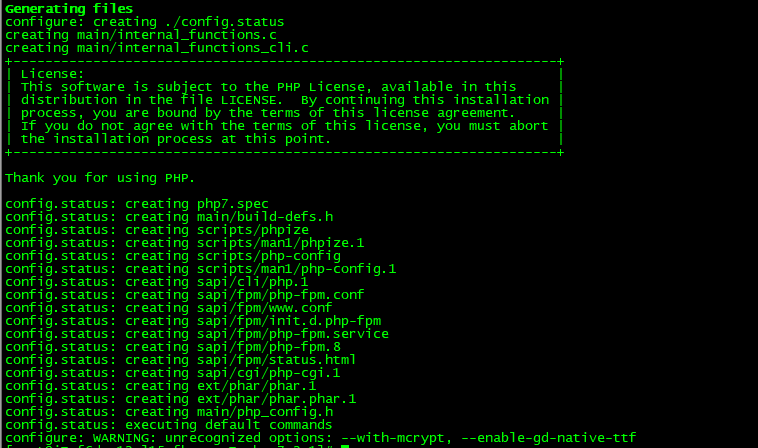
注意最后一行提示,有两个模块已经废弃,所以可以将上面这两个编译参数去除,再进行编译,然后make
make && make install
至此,php安装已经完成;
nginx安装
在安装nginx之前,首先应该确认gcc g++开发类库或者支持的模块儿是否装好,默认已经安装
安装make
yum -y install gcc automake autoconf libtool make
安装g++:
yum install gcc gcc-c++
安装gd-devel
yum -y install gd-devel
安装 perl-devel
yum -y install perl-devel perl-ExtUtils-Embed
创建nginx用户
useradd -s /sbin/nologin -M nginx
id nginx
然后开始安装nginx
1、下载nginx
wget http://nginx.org/download/nginx-1.12.2.tar.gz
2、解压nginx
tar -zxvf nginx-1.12.2.tar.gz
3、进入nginx目录
cd nginx-1.12.2
4、./configure编译
./configure
--prefix=/usr/local/nginx --sbin-path=/usr/local/nginx/sbin/nginx --modules-path=/usr/lib64/nginx/modules --conf-path=/usr/local/nginx/conf/nginx.conf --error-log-path=/var/log/nginx/error.log --http-log-path=/var/log/nginx/access.log --http-client-body-temp-path=/var/lib/nginx/tmp/client_body --http-proxy-temp-path=/var/lib/nginx/tmp/proxy --http-fastcgi-temp-path=/var/lib/nginx/tmp/fastcgi --http-uwsgi-temp-path=/var/lib/nginx/tmp/uwsgi --http-scgi-temp-path=/var/lib/nginx/tmp/scgi --pid-path=/var/run/nginx.pid --lock-path=/var/run/lock/subsys/nginx --user=nginx --group=nginx --with-http_ssl_module --with-http_v2_module --with-http_realip_module --with-http_addition_module --with-http_xslt_module=dynamic --with-http_image_filter_module=dynamic  --with-http_sub_module --with-http_dav_module --with-http_flv_module --with-http_mp4_module --with-http_gunzip_module --with-http_gzip_static_module --with-http_random_index_module --with-http_secure_link_module --with-http_degradation_module --with-http_slice_module --with-http_stub_status_module --with-http_perl_module=dynamic --with-mail=dynamic --with-mail_ssl_module --with-pcre --with-pcre-jit --with-stream=dynamic --with-stream_ssl_module --with-debug
最后make
make && make install